Posts

Showing posts with the label Power Platform

Power Platform - Recover Deleted Environments

Image
 As Power Platform admin users can recover the deleted environments. Microsoft only past 7 days deleted items. Following are steps to recover the deleted items, Open Power Platform Admin page on URL - https://admin.powerplatform.microsoft.com/ (only admin users will have the option to recover the environment) Click on Environments in the left Navigation In the Ribbon, Click on "Recover Deleted environments". It will navigate the Deleted Environments page. Select the Environment and click on "Recover". We will get a confirmation Pop-Up. Click on "Continue" button to confirm the recovery It may take hours to complete the restore the environment. 

Power Platform - Enable SharePoint document management

Image
SharePoint document management in Powe platform allow to store, mange the documents related to customer engagement apps like Dynamics 365 by enabling the document management. To enable this user should have System Admin role. We can enable the document management using the steps below, Open the Power Platform admin, navigate the environments Select the environment and click on Settings in the ribbon It will navigate to settings page.                      Select Integration and click on Document Management Settings Select the entities to manage the SharePoint documents and Click on Next In Consider these server-based integration settings - Check Based on entity to have document libraries and folders that are based on the Account entity automatically created on the SharePoint site. Users will not be prompted to create them. Click on Finish to complete the configuration.

PowerApps - Create Charts based on the SharePoint List data column Values

Image
While working with SharePoint list, I have a requirement to display bars based on one of the column data. Here are the sample data how it is in the list Name Amount Cement 50000 Iron 10000 Wood 40000 Wood 70000 Labor 8000 Wood 7000 Iron 5000 Labor 9000 I have added following Formulae to get the data.  AddColumns(GroupBy(ProductList,"Name","Grouped"),"Sum",Sum(Grouped,Amount)) After grouping the data we are able to see the data as chart as above.

PowerApps - Back to Basics - Update Lookup Column based on child list

While working on one of the PowerApps form, i have a requirement to update the lookup column based on the other list. I have two lists and both the lists having the lookup columns. When updating the record we will get the child look-up value and based on the child look-up value we need to update the parent list using the form. After navigating to the PowerApps and clicking on the one of the child list record, we need to pull out the records based on the Parent list and update the data in the parent list. I have used following formulae to update the records. With(      {              childListData: LookUp( <<Child List>> , <<Look-up Column Name>> = " <<Look-up Value>> ")      },      {                Id:  childListData .ID,               Value:  childListData .linkedCol...

PowerApp tip - Sum with Filter in Power Apps

While working with Power Apps i got a requirement to update the Sum of a column for the specific month and Save it in to a column. I have tried ForAll i see it was failed. After Using With and Filter as shown below i am able to achieve the functionality using the formulae as below. With(    {       SumValue :       Filter(          ' AccountsData ',          Month( DateFieldValue1 ) = Month(Now())       )    },    Sum(       SumValue ,       AmountValue    ) ) Here SumValue will get the value from List AccountData (Data). From Accounts list Amount Value will be summed-up.  Here we are applying the Filter based on the current month with the of the PowerApps form DateFieldValue. Getting the AccountsData and applying the filter with the DateFieldValue mentioned in the PowerApps forms.  After Summing the value, i ...

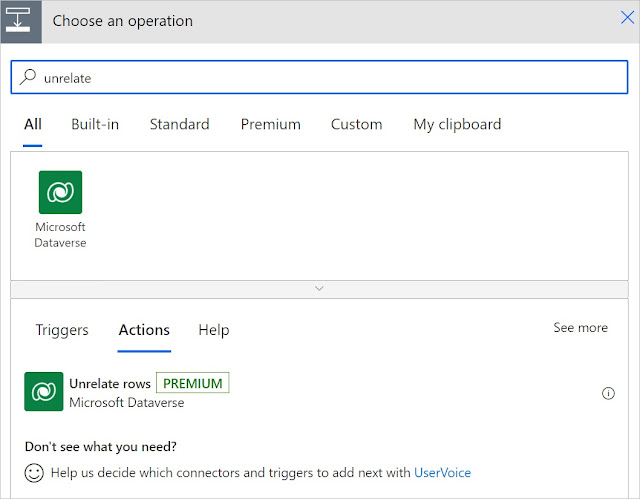
Unrelate the Rows in Dataverse using Flow

Image
Unrelate the rows in power Automate will be same as RelateRows. Rows will be unrelated using the action. To Unrelate the Rws we have the action as shown below. Adding UnrelateRows will have following details to be added, Table name - Name of the table to delete the relationship Row ID - GUID of the row to unrelated Relationship - Relationship details Unrelate with - URL of the  OData identifier of the resource

Relate Rows in Data verse using power Automate

Image
We can relate the Dataverse Records in Power Automate flow using RelateRows action. We can relate the tables if there is already a relation between two tables (One - Many or Many - Many) We can relate the rows in the flows using the steps below, In the actions, Search for Relate Rows We need to add following details once we add the action, Table Name - Name of the Table to create the Relationship Row ID - Unique RowID as GUID to create the relationship  Relationship - Relationship with other table as  Relate With -  resource URL of the row to add the relationship After adding the details, Save flow to create the relationship.

Perform a change set request in Dataverse

Image
In Power Automate flow, Changeset will help us to perform multiple operations at once. When multiple operations combined in a change set, if there is any operation fails all the transactions will roll back. In flow, we can add a new step as Change set as below In the Change Set we can multiple operations as below. We can add the multiple operations in the Dataverse change set as the image above.

PowerApps Back to Basics - Update VS UpdateIf

Update and UpdateIf functions helpful to update the records using PowerApps. Following are the syntax for Update and UpdateIf functions. Update( DataSource, OldRecord, NewRecord [, All ] ) DataSource is - Source of the data to update the records OldRecods - old records to be updated NewRecord - New record to be updated All - All is optional, if we mention this all the records matching this will be replaced. UpdateIf( DataSource, Condition1, ChangeRecord1 [, Condition2, ChangeRecord2, ... ] )    DataSource  is - Source of the data to update the records Condition1 - Conditions to get the records Change Records - Records to be changed, i.e after satisfying the condition this records will be updated. Following the two cases for Update and UpdateIf with Data Update(EmployeeData, First(Filter(EmployeeData, EmpName ="Mike"  )), {EmpFirstName: "Mike"});  In the above case, Update function will work on the fi...

Power Apps toPower Automate Error - The input body for trigger 'manual' of type 'Request' did not match its schema definition , the input String does not validate against the date

While working with power Apps to Power automate, passing the Date time values as Text(DateTimeValue) throws error as below. The input body for trigger 'manual' of type 'Request' did not match its schema definition. Error details: 'String '' does not validate against format 'date'.'. After checking the Microsoft documentation and few blogs i found out the date values should be passed as a formatted date time. TO pass the date time  we need to use following functions. Text(<<DateTimePicker>>.SelectedDate,"[$-en-US]yyyy-mm-dd") Even after passing the value i am still seeing the same issue and finally found out the default value ids sending as empty and formulae failing for empty values. So we need to make sure the Date Value should not go blank to the formulae and the value should be formatted using the formulae as above. Hope this helps.

Power Automate Trigger flow - on Specific file or Specific File Extension

Image
 We can trigger Power Automate flow to a SharePoint document library file But to trigger the flow to specific file or specific file extension in SharePoint document library. We can do that by setting the trigger condition by navigating to Settings and Click on adding new trigger condition as shown below. In the trigger condition we can pass the extension or file name as shown the formulae below. @equals(triggerOutputs()?['body/{FilenameWithExtension}'], 'FiletobeTriggered.txt') Similarly we can trigger the extension of the file as shown the below formulae @endswith(triggerOutputs()?['body/{FilenameWithExtension}'], '.docx') We can also set trigger for the folder using following formulae, @contains(triggerOutputs()?['body/{Path}'], '/TriggerFolder/')

Phone Calls Using PowerApps Launch

one of Client wanted to show the Phone Icon and by clicking on it, it should Launch the Call in Power Apps. There is direct option in Power Apps to open the call screen using Launch Function. Using Launch function as below, PowerApp will call the number. Launch("tel:1234567890") In the above function, PowerApps will call the number.  This function is working for the most of the devices. But iPhone 7 is not working as expected. By clicking on the icon, it just opening the Safari browser and doing nothing. After investigation, i found the resolution for iPhone 7 using the function below. Launch("tel:1234567890"). Hope this helps.

Remove Duplicate entries pulling from the collection

 One of my project required to remove the duplicates while pulling the data from a collection. i got the collection but i need to remove the duplicate and add the value to the collection (value removed from collection). I have used following code to achieve the functionality. ForAll(colI mportedData As Col,    If(       CountRows(          Filter(              colI mportedData,             ID=  Col .ID          )       ) > 1,       Collect(           removedData,           {               Title: "Title",               ID: ID                          }       )    ) ); Here colImportedData is imported...

PowerApps - Encoding URL and Converting HTML text

PowerApps allowing users to  Encode the URL and converting the HTML Text. Using Encode function,we can Encode the URL string. EncodeUrl function will convert the special characters with % value and a hexa decimal number. For Example, if i pass a string - " https://make.powerautomate.com/environments/ " as input to the EncodeUrl, it returns the value as " https%3A%2F%2Fmake.powerautomate.com%2Fenvironments%2F " EncodeUrl function accepts string as parameter and it is required . It returns the Encoded Url as result. PlainText() function in PowerApps converts the HTML/XML tags  in to proper text. For example if we pass the Value to Plain Text as  <P> Hello This is Sample text from &nbsp;&quot;Tech Battle Field &quot; &nbsp; blog. </P> It returns the result as  Hello, This is Sample text from "Tech Battle Field" blog generally we use PlainText() function when we get the data from RSS feeds and shown them in the PowerApp. RSS feeds w...

ColorValue in PowerApps

Image
 In PowerApps to update the CSS color using following functions Color ColorValue RGBA Using Color we have the enumerated values as shown below. Color.Red  Color.Yellow Using Color Value we can pass the 6 - digit or 8- digit hex values or Color name as shown below. ColorValue( "#faebd7" ) ColorValue( "#54 faebd7 " ) ColorValur("Red") Using RGBA, We can pass the Red, Green, Brown, Alpha as shown below. RGBA(255,2555,255,0) 

RequestHide() function in PowerApps

Image
RequestHide() function in PowerApps will allow users to hide the SharePoint form. This function will allow only on SharePoint forms integration with PowerApps. RequestHide() function will hide the form. We need to call RequestHide() function on Success() function of the form. By default on Cancel() function will be automatically hide the form.

Spell Checks are not working in PowerApps

Image
While working with one of the client, client wanted to allow spell checks in the multiline text boxes. We have option in PowerApps to enable Spell checks by updating  EnableSpellCheck   option as below. After enabling the Spell check Property, Spell check is not working as expected. After investigating further, i found following update from PowerApp community an found Spell Check is not enabled in Chrome. I see Spell check Disabled in my chrome. I have updated the Spell check as below. After enabling the spell check in chrome, Spell check worked as expected.

PowerApps Gallery - Showing one item on each page

One of my project i have used Gillery and inside the gallery i have used two levels. Based on the first Gallery items, the inner Galleries data will be loaded. On the Top/Fist gallery i am showing only one item per page and added Next button on the bottom to show the next Item. By default Power Apps Gallery will load all the items at once. In my case i want to load one item and based on the item values the other two Galleries will be populated. For the First Gallery i have used following formulae, In the Items property i have added below formulae,   Table( Last( FirstN(<<Data Source>>, Coalesce(<<Variable>>, 1))) In Next button "On Select" property i have added following formulae,   UpdateContext({<<Variable>>: Coalesce(<<Variable>>, 1) +1}) Here we are getting First Non-Blank value (using Coalesce  function .) and mapping it to a variable. For each case we are getting the next value and binding it to the variable. In the It...

PowerApps - Restrict a Text Box to 2 decimals

 One of my project got a requirement to restrict the Text box to 2 decimal point. By default PowerApps not giving the option to restriction option. But we can do that using the formulae using the steps below. Update following commands in "On Change" event of the Text Box. UpdateContext(    {        texBoxValue :        Round(          Value(Self.Text),          2       )    } ); Reset(Self)  Update variable in "Default" of the Text Box.                          texBoxValue Hope this helps.

Submit as template in Power Automate

Image
 Power Automate flow will have the ability to save the flow as template in Power Automate Gallery. This will help the users to re-use the template once the Power Automate team approve the flow to publish in the Gallery. We can use the steps to create the template.  Navigate the flows. Click on Details in the flow as below Click on Submit as Template on the Top navigation as below. To submit the template, low must run at least once. If flow not ran anytime, we can see the error.  If flow ran at least once, it will navigate to following screen. Provide Name, Description, Benefit, Number of Users, Number of Runs and Category details. and Click on Submit. Once Submit the details, Power Automate Team will review the template and updates in the Gallery.